Wednesday, 26 April 2017

各地方法院所屬民間公證人登錄名冊--臺灣臺北地方法院


online version 

download version :

指定設事務所地區、事務所名稱及地址


臺北地方法院轄區第三區(松山、信義區)
臺灣臺北地方法院所屬民間公證人陳幼麟事務所
臺北市松山區南京東路3段285號3樓之1

電話:(02)27197889

手機:0920-634073
網址:http://www.notary.idv.tw

臺灣臺北地方法院所屬民間公證人趙原孫事務所
臺北市松山區南京東路3段346號9樓901室
電話:(02)27783405
手機:0939-951559

臺灣臺北地方法院所屬民間公證人楊昭國盧榮輝聯合事務所(負責公證人楊昭國)
臺北市中山區復興北路58號2樓A室
電話(02)27215888
傳真:(02)27215958
手機:0921-118118

臺灣臺北地方法院所屬民間公證人楊昭國盧榮輝聯合事務所(負責公證人楊昭國)
臺北市中山區復興北路58號2樓A室
電話:(02)27215888
傳真:(02)27215958
手機:0930-225715
電子信箱:notarlu@pchome.tw

臺灣臺北地方法院所屬民間公證人重慶聯合事務所(負責公證人:謝永誌)
臺北市重慶南路1段121號7樓之1
電話:(02)23888688
傳真:(02)23318361
電子信箱:rocklaw1@ms34.hinet.net

臺灣臺北地方法院所屬民間公證人陳建源事務所
臺北市長安東路2段62號2樓
電話:(02)25074587
手機:0952-436723

臺灣臺北地方法院所屬律衡民間公證人事務所
(負責公證人:詹晉良)
臺北市中正區襄陽路6號6樓
電話:(02)23140918
傳真:(02)23140943
電子信箱:notaryjacky@yahoo.com.tw

臺灣臺北地方法院所屬律衡民間公證人事務所
(負責公證人:詹晉良)
臺北市中正區襄陽路6號6樓
電話:(02)23140918
傳真:(02)23140943
電子信箱:shelly8865@kimo.com.tw

臺灣臺北地方法院所屬民間公證人重慶聯合事務所(負責公證人:謝永誌)
臺北市中正區重慶南路1段121號7樓之1
電話:(02)23888688
傳真:(02)23318361
電子信箱:f1234178@ms37.hinet.net

臺灣臺北地方法院所屬民間公證人林家光事務所
臺北市復興南路2段237號7樓(700室)
電話:(02)27023278
傳真:(02)27023149

臺灣臺北地方法院所屬律衡民間公證人事務所
(負責公證人:詹晉良)
臺北市中正區襄陽路6號6樓
電話:(02)23140918
傳真:(02)23140943

臺灣臺北地方法院所屬民間公證人吳碩仁事務所
臺北市敦化北路207號7樓之13
電話:(02)27168251
手機:0910027878
傳真:(02)27168252

臺灣臺北地方法院所屬民間公證人忠孝聯合事務所(負責公證人:鄭艾侖)
臺北市忠孝東路4段285號6樓之3
電話:(02)87722305
手機:0922-429197
傳真:(02)87722309

臺灣臺北地方法院所屬民間公證人忠孝聯合事務所(負責公證人:鄭艾侖)
臺北市忠孝東路4段285號6樓之3
電話:(02)87722305
手機:0953-018086
傳真:(02)87722309
電子信箱:whitniewu@pchome.com.tw

臺灣臺北地方法院所屬民間公證人陳永星事務所
臺北市羅斯福路3段126號4樓之3
電話:(02)23679845
手機:0930-033304
傳真:(02)23679871
電子信箱:cstar@seed.net.tw

臺灣臺北地方法院所屬僅辦理文書認證民間公證人許文彬律師事務所
臺北市中正區仁愛路2段25號3樓
電話 :(02)23935564
傳真 :(02)23939418
電子信箱:hsuwp2002@yahoo.com.tw

臺灣臺北地方法院所屬僅辦理文書認證民間公證人林昇格律師事務所
臺北市重慶南路1段77號6樓之1
電話:(02)23816027
傳真:(02)23822507
電子信箱:1amariti@ms17.hinet.net

臺灣臺北地方法院所屬僅辦理文書認證民間公證人聯立法律事務所
臺北市羅斯福路6段218號4樓
電話:(02)29339438*197
傳真:(02)29300350
電子信箱:jt1iao@ms2.hinet.net

臺灣臺北地方法院所屬僅辦理文書認證民間公證人明鏡事務所
臺北市寧波西街92號12樓之1
電話:(02)23222363
傳真:(02)23921899
電子信箱:mj1tom@ms16.hinet.net

臺灣臺北地方法院所屬謹辦理文書認證民間公證人寰瀛法律事務所
臺北市仁愛路4段376號7樓
電話:(02)27058086*101
傳真:(02)27033508、27085628
電子信箱:diy@mail.fb1aw.com.tw

臺灣臺北地方法院所屬僅辦理文書認證民間公證人何邦超律師民間公證人事務所
臺北市大安區羅斯福路2段17號11樓之1
電話:(02)23693598
傳真:(02)23688696
電子信箱:ts1041175@mail.my.net.tw

臺灣臺北地方法院所屬僅辦理文書認證民間公證人姜禮增律師民間公證人事務所
臺北市重慶南路1段121號620室

電話:(02)23882701

Thursday, 13 April 2017

delete virus - ourluckysites, deskapp , WINSNARE ,SNARER,Kyubey,MIO,startpageing123

I made a mistake to run a virus program so my laptop got virus. 

I have tried to clean all virus by myself without downloading any program. 

1. I remove application - deskapp and WINSNARE . 

  1. Press Win+R and type Control Panel into the open box.
  2. Click OK and go to Uninstall a program.
  3. Highlight the application and click Uninstall.


2. Delete all virus folders. 

C:\Users\KennethHu\AppData\Roaming\
C:\Users\KennethHu\AppData\local\
C:\Windows\Temp


  C:\Users\KennethHu\AppData\Roaming\WINSNARE\WinSnare.dll
WinSAPSvc
WinSAP.dll
MIO.dll
Kyubey.exe
MIO.exe
....... 

3. Hold the Start Key and R –  copy + paste the following and click OK:
notepad %windir%/system32/Drivers/etc/hosts
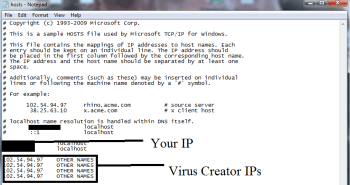
A new file will open. If you are hacked, there will be a bunch of other IPs connected to you at the bottom. Look at the image below:
hosts_opt (1)

4. After you complete this step, the threat will be gone from your browsers. Finish the next step as well or it may reappear on a system reboot.
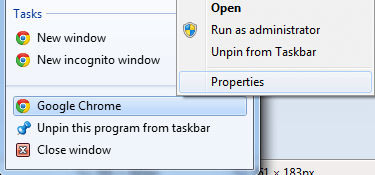
Right click on the browser’s shortcut —> Properties.
NOTE: We are showing Google Chrome, but you can do this for Firefox and IE (or Edge).
browser-hijacker-taskbar-propertiest

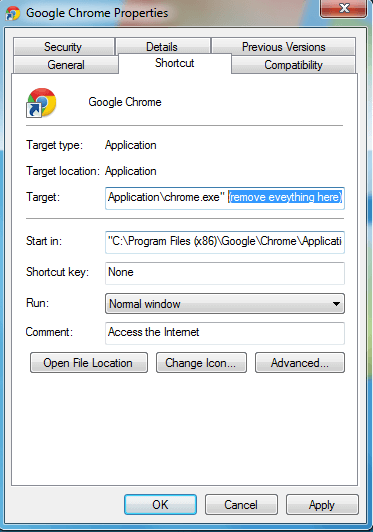
Properties —–> Shortcut. In Target, remove everything after .exe.
If u got virus, it will become 
"C:\ProgramFiles(x86)\Google\Chrome\Application\chrome.exe" http://www.ourluckysites.com/?type=sc&ts=1491368372&z=95570b72381db34651c485cg4z1t1g4c3q0b7cfqdo&from=che0812&uid=SanDiskXSD7SB2Q-512G-1006_153581400776
Correct it to "C:\Program Files (x86)\Google\Chrome\Application\chrome.exe" 
ie9-10_512x512  Remove WinSnare from Internet Explorer:
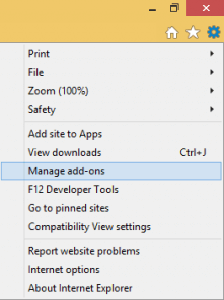
Open IE, click  IE GEAR —–> Manage Add-ons. remove wired search Providers.  please refer this - http://guides.uufix.com/guide-to-remove-startpageing123-com-completely/
pic 3
My search providers after clean virus search provider.

Find the threat —> Disable. Go to IE GEAR —–> Internet Options —> change the URL to whatever you use (if hijacked) —> Apply.

firefox-512 Remove WinSnare from Firefox:

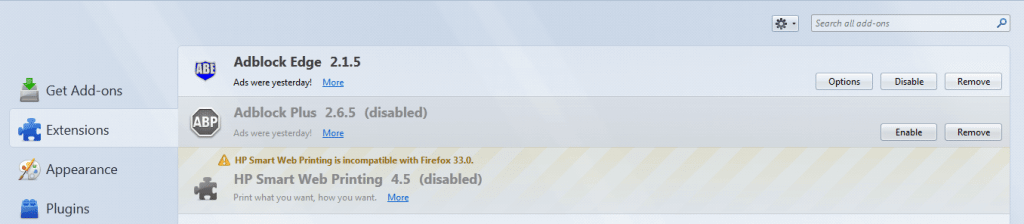
Open Firefox, click  mozilla menu  ——-> Add-ons —-> Extensions.
pic 6

Find the adware/malware —> Remove.
chrome-logo-transparent-backgroundRemove WinSnare from Chrome:

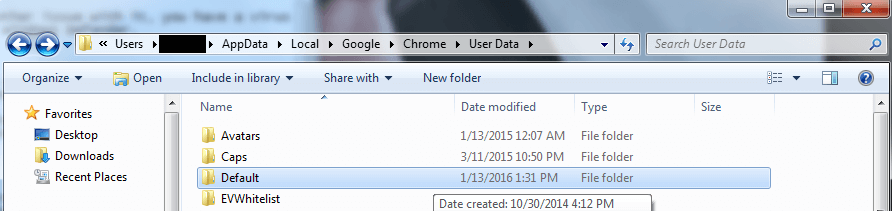
Close Chrome. Navigate to:
 C:/Users/!!!!USER NAME!!!!/AppData/Local/Google/Chrome/User Data. There is a Folder called “Default” inside:
Rename the Folder to Backup Default
Rename it to Backup Default. Restart Chrome.
5. I delete all browsers- chrome , firefox and reinstall them again. 


6.At begin, I thought all virus was remove but it come up again at certain time. 
My case is around 545 P.M.  My Chrome will suddenly close and open again but homepage will redirect to ourluckysites site or other site.

I found out that virus register service in Service.exe and create task in task scheduler.  
1. stop service. 
2. delete folder where file is. 
3. delete service in cmd.exe -  SC Delete [service name]
4. delete task in task scheduler. 


Is it finish?  No, it still will come up and self-install above services and programes. 

I believe that the problem must in service.exe or task scheduler.

I open Powershell and execute  "Get-WmiObject win32_service | ?{$_.Name -like '*'} | select Name, DisplayName, State, PathNames"  -- refer to this http://stackoverflow.com/questions/24449113/how-can-i-extract-path-to-executable-of-all-services-with-powershell

2. find out a virus - FirefoxUpdate.exe  - At this time, I already remove firefox.  FirefoxUpdate.exe should be not in there. In addition, I cannot see this service in services panel. So I delete it and do above steps again.   
Please refer to this - https://trojan-killer.net/firefoxupdate-exe-uvconverter-exe-adware-remove/


Until now, I did not see virus again. I hope I really remove all virus from my laptop. 

Sunday, 9 April 2017

How to fix taskbar search not working in Windows 10

How do I fix my taskbar search in Windows 10?
Once in awhile, Windows 10 decides it doesn't want to search from the taskbar anymore. Why? Detective work is hard work.There are several solutions to this problem but the best idea is to restart Windows Explorer.  

開機使用一段時間後,Windows 10 的 search bar 會無法搜尋。為什麼?也許是搜尋工作是艱苦,Search bar 罷工了。這個問題有幾種解決方案,但最好的辦法是重新啟動Windows資源管理器。我們來看看我們是否無法修復Windows 10中的任務欄搜索。
        

Restart Windows Explorer  重新啟動Windows資源管理器

Another quick fix attempt, restarting Windows Explorer might jump-start the taskbar search into working again.
重新啟動Windows資源管理器可能會啟動任務欄搜索再次工作。

  1. Right-click the Start button.
  2. Click Task Manager.
    Right-click the Start button. Click Task Manager.
  3. Click Windows Explorer. It's located near the bottom of the Task Manager menu.
  4. Click End task.
    Click Windows Explorer. Click Restart.
  5. When Windows Explorer is disappeared, Click Run new Task under File menu.


  6. Open: C:\Windows\explorer.exe
  7. Click: OK
  8. After Windows Explorer restart, Search bar will work.
  9. Read on if you still can't search from your Windows 10 taskbar. 


how-to-recursively-create-subfolder-in-each-folder-of-a-directory-in-cmd

test.cmd: @echo off setlocal for /f "usebackq tokens=*" %%a in (`dir /b /a:d`) do ( rem enter the directory pushd %%a echo...